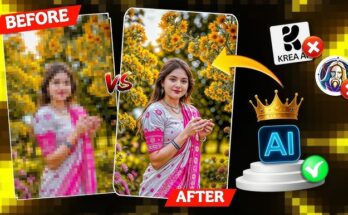
In the ever-evolving world of digital photography and visual design, AI-powered 16K photo quality editing has become one of the most exciting and futuristic trends in 2025. With smartphones, DSLRs, and AI art generators producing increasingly high-resolution images, the demand for ultra-HD editing tools that can keep up has never been higher.
In this comprehensive guide, we’ll explore everything about AI-based 16K photo editing—from what 16K actually means, how artificial intelligence enhances photo quality, to the best apps, software, and tools to achieve breathtaking results. Whether you’re a content creator, photographer, designer, or AI art enthusiast, this article will help you elevate your visual creations to the next level.
📸 What Is 16K Photo Quality?
Before we dive into AI editing, let’s clarify what 16K resolution actually is.
✅ 16K Resolution Breakdown
-
Resolution: 15,360 × 8,640 pixels
-
Total Pixels: 132.7 million pixels
-
Aspect Ratio: 16:9
-
Compared To:
-
4K (3840 × 2160): 8.3 million pixels
-
8K (7680 × 4320): 33.2 million pixels
-
16K resolution offers unparalleled detail and sharpness, ideal for large-scale prints, ultra-wide monitors, commercial visuals, and professional media production.
🤖 The Role of AI in 16K Photo Editing
Manually editing such high-resolution files is labor-intensive and hardware-intensive. That’s where AI tools step in—offering smart, fast, and efficient upscaling, enhancement, and retouching of 16K images using deep learning algorithms.
💡 Key AI Capabilities in 16K Editing
| Feature | Description |
|---|---|
| 🔍 AI Upscaling | Converts lower-resolution photos (like 4K/8K) to 16K using machine learning models. |
| 🎯 Object Recognition | Isolates subjects (faces, skies, textures) for targeted enhancements. |
| 🪞 AI Retouching | Removes blemishes, smooths skin, sharpens eyes automatically. |
| 🎨 Style Transfer | Applies visual styles like cinematic, anime, oil painting, or realism. |
| 🌆 Background Replacement | AI can detect and replace entire backgrounds without losing detail. |
| 🧠 Noise Reduction | Removes visual noise and artifacts while preserving texture. |
🔥 Why 16K Photo Editing Is Trending in 2025
Let’s look at what’s fueling the massive growth of 16K photo editing and AI upscaling:
-
Widespread AI Art Tools: Tools like MidJourney, DALL·E, and Leonardo.AI generate highly detailed artwork that users want to upscale further.
-
Pro-Level Content Creation: YouTubers, NFT artists, and photographers demand cinematic quality.
-
AI in Smartphones: Flagships like Samsung S24 Ultra and Google Pixel 9 use AI to capture ultra-high-res RAW images.
-
Gigapixel Printing: Commercial photographers and advertisers need massive resolutions for billboards and posters.
-
Social Media Impact: Crisp, stunning images grab attention and drive engagement on Instagram, Pinterest, and Threads.
🧰 Top AI Tools for 16K Photo Quality Editing in 2025
Here’s a list of the best AI-powered platforms that support 16K editing, upscaling, and enhancement:
1. Topaz Gigapixel AI
Best for: Professional 16K Upscaling
Topaz Gigapixel AI uses advanced deep learning models trained on millions of images to upscale images up to 600%.
Key Features:
-
Upscale to 2x, 4x, 6x, and beyond
-
Smart sharpening and detail recovery
-
Batch processing support
Pros:
-
Excellent for print and commercial work
-
Maintains natural detail without looking artificial
Cons:
-
Paid software, resource-intensive
Available on: Windows, macOS
2. Let’s Enhance
Best for: Cloud-based 16K Upscaling
Let’s Enhance is a web-based AI image enhancer ideal for scaling up images for eCommerce, real estate, or art.
Key Features:
-
16x upscaling (up to 500MP)
-
AI color correction, tone balancing
-
Face enhancement module
Pros:
-
No installation required
-
Supports JPG, PNG, WebP, and RAW
Cons:
-
Subscription-based, limited free usage
Available on: Web browser
3. Remini Pro (2025 Edition)
Best for: Mobile AI Photo Enhancement
Remini has evolved into a professional-grade AI enhancer for 16K editing on mobile devices. It’s perfect for restoring old photos and creating crystal-clear portraits.
Key Features:
-
Face enhancement to 16K resolution
-
Background blur, sharpening, filters
-
AI retouching for hair, eyes, and skin
Pros:
-
One-tap editing
-
Fast processing, lightweight
Cons:
-
Watermark in free version
Available on: Android, iOS
4. Adobe Photoshop with AI Plugins (Firefly, Neural Filters)
Best for: Full editing control
Adobe has embraced AI heavily in its latest releases. With Photoshop Firefly and Neural Filters, users can now edit, restore, and generate 16K photos with precision.
Key Features:
-
Sky replacement with AI
-
AI portrait retouching
-
Super resolution for RAW to 16K
Pros:
-
Industry-standard editing suite
-
Huge plugin library
Cons:
-
Steep learning curve
-
Subscription required
Available on: Windows, macOS
5. VanceAI Image Enhancer
Best for: One-click 16K improvements
VanceAI offers a suite of AI tools like photo enlarger, sharpener, background remover, and portrait retouching—all of which support high-resolution output.
Key Features:
-
Batch upscaling
-
AI-powered skin smoothing and texture repair
-
Custom aspect ratios for output
Pros:
-
Simple interface
-
Affordable pricing plans
Cons:
-
Limited free credits per month
Available on: Web, Windows app
🎨 AI 16K Editing Workflow: From Start to Finish
Want to turn your 8K image into a 16K masterpiece? Follow this workflow:
Step 1: Source Your Base Image
Start with a high-quality photo (at least 4K or 8K resolution). Ideal sources include:
-
DSLR or mirrorless RAW files
-
AI-generated art from MidJourney or DALL·E
-
Smartphone Pro mode shots
-
Scanned high-res prints
Step 2: Use AI to Upscale to 16K
Use a tool like Topaz Gigapixel AI or Let’s Enhance to upscale your image while retaining details.
-
Choose a 2x or 4x upscaling model
-
Select the enhancement type: Standard, Lines, Art & CG
-
Export in TIFF or PNG for maximum quality
Step 3: AI-Based Retouching & Enhancement
Apply detailed edits such as:
-
Skin smoothing using Remini Pro or Neural Filters
-
Sky replacement with Photoshop AI
-
Noise removal with VanceAI Denoiser
-
Lens correction and brightness adjustment
Step 4: Export in High-Quality Format
Always export your 16K image in lossless formats:
-
TIFF for professional use
-
PNG for web
-
JPEG (High Quality) if needed
Step 5: Optimize for Viewing or Print
-
Use TinyPNG or Squoosh to compress for web
-
For printing, ensure the correct DPI (300 or higher)
-
Save backup copies in PSD or RAW format
🧠 Advanced AI Editing Techniques for 16K Projects
For those who want more than basic upscaling, try these advanced tricks:
1. AI + Prompt-Based Image Inpainting
Use DALL·E or Photoshop Firefly to modify parts of a 16K photo by typing prompts (e.g., “replace sky with sunset”).
2. Face Detail Replacement
Use AI face restoration on portraits (swap blurry faces with realistic ones using trained GANs).
3. 16K Anime or CGI Style Transfer
Convert your realistic photo into anime or fantasy artwork using apps like PhotoDirector, Lensa AI, or Toongineer.
4. Multi-Model Enhancement
Combine tools:
-
Start with MidJourney 5.2 for base image
-
Enhance with Remini
-
Upscale with Topaz
-
Retouch in Photoshop
This multi-AI pipeline yields studio-quality results.
📈 SEO Tips: How to Rank AI 16K Photo Content Online
If you’re showcasing your 16K edits, follow these SEO practices:
| SEO Element | Strategy |
|---|---|
| 📸 Image Name | Use descriptive filenames: ultra-hd-ai-landscape-16k.jpg |
| 🏷️ Alt Text | Add alt text like “AI-enhanced 16K forest image with golden light” |
| 📍 Keywords | Use LSI terms: AI photo enhancement, 16K image editing, upscaling software |
| 📝 Blog Content | Create tutorials and behind-the-scenes posts |
| 📱 Social Media | Post carousels and reels of before/after edits |
🧩 Real-World Use Cases of 16K Editing with AI
| Industry | Use Case |
|---|---|
| 🎥 Film Production | Matte painting, CGI textures |
| 🖼️ Digital Art | NFT collections, concept art |
| 🛍️ eCommerce | Ultra-clear product images |
| 📰 Publishing | Magazine covers, ads |
| 🧑🎓 Education | Visual textbooks, online course graphics |
🧠 Challenges in 16K AI Photo Editing (And How to Solve Them)
| Challenge | Solution |
|---|---|
| 🖥️ Hardware Limitations | Use cloud tools like Let’s Enhance or VanceAI |
| ⏳ Long Render Times | Batch process overnight |
| ⚙️ Storage Size | Use cloud storage like Google Drive, Dropbox |
| 🎨 Over-processing | Use sliders to limit enhancement levels |
| 📉 Loss of Authenticity | Combine AI edits with manual retouching for balance |
🧾 Final Thoughts: The Future Is Ultra-HD and AI-Driven
In 2025, AI and 16K photo quality editing go hand in hand to deliver images that were once impossible to create manually. From one-tap enhancements on mobile apps to professional pipelines for filmmakers and artists, AI tools have made 16K editing accessible, affordable, and astonishingly powerful.
Whether you’re improving family portraits, creating commercial assets, or building a visual portfolio, these tools can turn your vision into pixel-perfect reality.
For more Information Click Here