In the fast-moving world of short-form video content, AI bike transition videos have become a viral sensation. From Instagram Reels and TikTok to YouTube Shorts and brand commercials, these videos use artificial intelligence to create smooth, cinematic transitions involving bikes—transforming scenes, outfits, environments, or even characters in a visually striking way.
What makes AI bike transition videos so popular is their ability to combine motion, storytelling, and technology. A simple clip of someone riding a bike can be transformed into a dramatic transition—from casual clothes to racing gear, from city streets to mountain trails, or from reality into a futuristic AI-generated world.
In this comprehensive guide, you’ll learn exactly how to create an AI bike transition video from scratch, even if you’re a beginner. We’ll cover tools, planning, filming, AI techniques, transitions, editing tips, SEO optimization for video platforms, and common mistakes to avoid.
By the end of this article, you’ll have everything you need to create stunning, share-worthy AI bike transition videos.
What Is an AI Bike Transition Video?
An AI bike transition video is a video where artificial intelligence is used to create smooth, visually impressive transitions involving a bicycle or bike rider. These transitions often include:
-
Outfit changes while riding
-
Scene changes (city → mountains → desert)
-
Bike transformations (normal bike → sports bike → futuristic bike)
-
Rider transformations (human → AI avatar → animated character)
-
Time-shift effects (past → present → future)
AI tools analyze motion, frames, and objects in the video to generate seamless transitions that would normally require advanced VFX skills.
Why AI Bike Transition Videos Are Trending
1. Perfect for Short-Form Platforms
AI bike transition videos perform exceptionally well on TikTok, Instagram Reels, and YouTube Shorts because they:
-
Grab attention in the first 3 seconds
-
Use motion and surprise
-
Feel cinematic despite short length
2. No Advanced Editing Skills Required
Thanks to AI, creators no longer need years of video editing or VFX experience. AI tools handle:
-
Object tracking
-
Motion blur
-
Scene blending
-
Style transformation
3. High Engagement and Shareability
Bike transitions feel dynamic and energetic, making viewers more likely to:
-
Watch till the end
-
Replay the video
-
Share with friends
Essential Tools to Create AI Bike Transition Videos
Before you start, you’ll need the right combination of recording, AI, and editing tools.
1. Camera or Smartphone
You don’t need a professional camera. Many viral AI bike transition videos are shot on:
-
iPhone or Android (1080p or 4K)
-
Action cameras like GoPro
-
DSLR or mirrorless cameras (optional)
2. AI Video Editing Tools
Some popular AI-powered tools include:
-
AI video generators
-
AI motion tracking software
-
AI style-transfer tools
-
AI frame interpolation tools
These help create smooth transitions and realistic effects.
3. Video Editing Software
You may still need a basic editor for trimming and arranging clips. Examples:
-
Beginner-friendly editors
-
Mobile video editing apps
-
Professional desktop editors
4. Optional AI Image Tools
If your transition includes AI-generated scenes or bikes, AI image tools can help create backgrounds or futuristic designs.
Step 1: Plan Your AI Bike Transition Video
Define the Story
Every great transition video starts with a simple story. Ask yourself:
-
What is changing?
-
When does the transition happen?
-
What emotion should the viewer feel?
Example ideas:
-
Casual rider → professional racer
-
City commute → extreme mountain biking
-
Present day → futuristic AI world
Choose the Transition Moment
The transition usually happens at:
-
A jump
-
A spin of the wheel
-
A hand gesture
-
A camera whip or blur
-
A beat drop in the music
This moment is crucial—it’s where AI magic happens.
Step 2: Record the Base Bike Footage
Shooting Tips for Best AI Results
-
Keep the camera stable
-
Use consistent lighting
-
Avoid cluttered backgrounds
-
Record multiple takes
Frame Consistency
AI works best when:
-
The rider stays in the same position
-
The bike angle remains similar
-
Camera distance doesn’t change drastically
Common Shots Used in Bike Transition Videos
-
Riding toward the camera
-
Side tracking shots
-
Jumping or lifting the front wheel
-
Slow-motion ride-by
Step 3: Prepare the Transition Clip
Now record the second clip, which will appear after the transition.
Examples:
-
Same rider with different outfit
-
Different bike
-
Different environment
-
AI-generated version of the rider
Make sure:
-
The rider’s position matches the first clip
-
Movement direction is the same
-
Camera angle is similar
This consistency allows AI to blend the clips smoothly.
Step 4: Use AI to Create the Transition Effect
AI Motion Tracking
AI tracks:
-
The bike frame
-
Wheels
-
Rider’s body
-
Background movement
This allows seamless blending between scenes.
AI Style or Scene Transformation
Depending on your goal, AI can:
-
Change the environment
-
Alter the bike design
-
Transform clothing
-
Add futuristic or cinematic effects
AI Frame Interpolation
This creates extra frames between clips, making transitions smoother and more natural.
Step 5: Add Visual Enhancements
To make your AI bike transition video stand out, enhance it with:
Motion Blur
Adds realism when switching scenes quickly.
Light Flashes or Glitches
Perfect for:
-
Futuristic themes
-
Cyberpunk styles
-
High-energy edits
Speed Ramping
Slow down before the transition, then speed up after for dramatic effect.
Step 6: Choose the Right Music
Music is critical for engagement.
Best Music Styles for Bike Transition Videos
-
EDM
-
Trap
-
Phonk
-
Cinematic beats
-
Bass drops
Sync the Transition to the Beat
The transition should happen:
-
On a beat drop
-
During a bass hit
-
At a music pause
This makes the video feel intentional and satisfying.
Step 7: Final Editing and Color Grading
Trim for Short-Form Content
Ideal lengths:
-
7–12 seconds for TikTok
-
8–15 seconds for Instagram Reels
-
Under 20 seconds for YouTube Shorts
Color Grading Tips
-
Increase contrast slightly
-
Boost saturation carefully
-
Match colors between clips
Consistency makes the AI transition feel natural.
Step 8: Export Settings for Best Quality
For most platforms:
-
Resolution: 1080×1920 (vertical)
-
Frame rate: 30 or 60 fps
-
Format: MP4
-
High bitrate for clarity
Advanced Ideas for AI Bike Transition Videos
Once you master the basics, try these advanced concepts:
AI Avatar Rider
Transform the rider into an AI-generated character mid-ride.
Environment Morphing
Turn roads into neon highways or fantasy landscapes.
Time-Travel Transitions
Switch between past, present, and future cycling styles.
Brand-Focused Transitions
Perfect for:
-
Bike brands
-
Sportswear promotions
-
Tech product launches
Prompt:
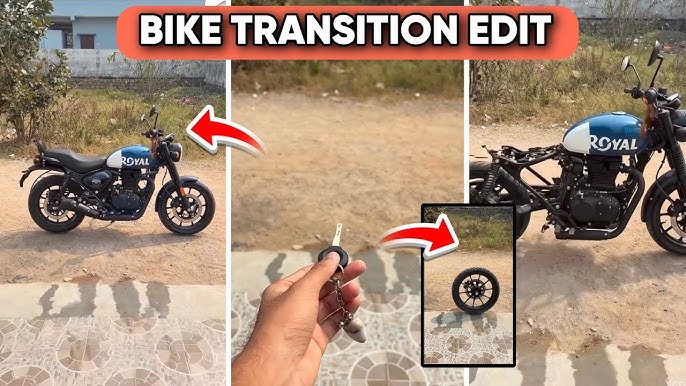
The key falls in smooth slow motion and transforms into a rotating motorcycle front tyre as it touches the ground, with soft dust flowing outward. Motorcycle parts enter from outside the frame in a strict step-by-step order: first the fuel tank, then the rear tyre, followed by all remaining components-frame, suspension, engine, exhaust, handlebars, seat, panels, cables, bolts, and body elements-each rotating, aligning, and attaching one by one with precise mechanical motion. The assembly is fast but sequential, with only one major part attaching at a time, enhanced by motion blur, air movement, and ground dust. The motorcycle completes seamlessly into the second image, fully assembled and realistic as dust Settles.
Monetization Opportunities
AI bike transition videos aren’t just fun—they can be profitable.
Ways to Make Money
-
Brand sponsorships
-
Affiliate marketing
-
Paid editing services
-
Social media creator funds
-
Selling presets or templates
High-quality AI transitions help creators stand out and attract deals.
Future of AI Bike Transition Videos
As AI technology evolves, we can expect:
-
Real-time AI transitions
-
Fully AI-generated bike rides
-
Personalized AI cycling avatars
-
Interactive AI videos
Creators who start now will be ahead of the curve.
Final Thoughts
Creating an AI bike transition video is no longer limited to professional filmmakers. With the right planning, basic filming skills, and AI-powered tools, anyone can create cinematic, viral-ready content.
The key is:
-
Strong concept
-
Clean footage
-
Smart AI usage
-
Music-driven transitions
-
Consistent editing
Whether you’re a content creator, marketer, or cycling enthusiast, AI bike transition videos offer an exciting way to tell stories, build an audience, and stand out in a crowded digital world.
Now it’s your turn—grab your bike, plan your transition, and let AI do the magic 🚴♂️✨
For more Relatic Articls Click Here