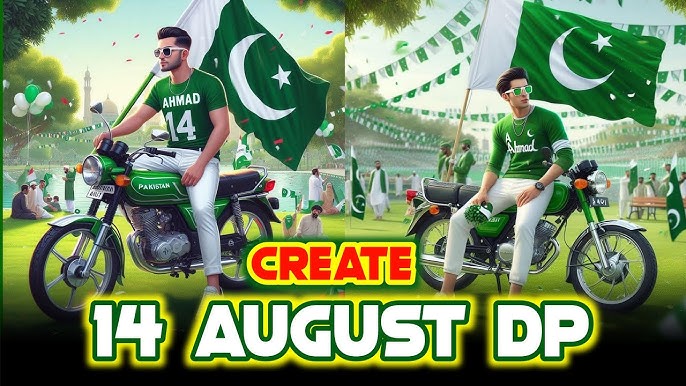
Every year on 14 August, millions of Pakistanis celebrate Pakistan Independence Day by sharing patriotic photos, videos, and social media posts. In 2026, the biggest trend is creating AI-generated 14 August photos that look realistic, cinematic, and professional.
Thanks to artificial intelligence, anyone can create beautiful Independence Day portraits without expensive cameras or advanced editing skills. Whether you want a stylish profile picture, a family portrait, a fantasy background, or a cinematic Pakistani flag-themed image, AI tools can generate it within seconds.
In this complete guide, you’ll learn everything about creating trending AI 14 August photos, the best AI generators, writing effective prompts, and editing your images to make them stand out on platforms like Facebook, Instagram, TikTok, WhatsApp, and X.
Why AI 14 August Photos Are Trending
Artificial Intelligence has transformed photo editing. Instead of spending hours using complicated software, AI can generate stunning images with just a few words.
Here are some reasons why AI Independence Day photos have become so popular:
- Professional-looking images in seconds
- No graphic design experience required
- Perfect for social media profile pictures
- High-quality HD and 4K output
- Creative backgrounds with Pakistani landmarks
- Custom clothing and patriotic themes
- Easy sharing across all social platforms
Thousands of users create personalized Independence Day portraits each year, making AI-generated images one of the biggest online trends during August.
What Are AI 14 August Photos?
AI 14 August photos are digitally created or enhanced images generated with artificial intelligence. These images usually feature:
- Pakistan’s green and white flag
- Crescent and star effects
- Green smoke backgrounds
- Fireworks
- Minar-e-Pakistan
- Badshahi Mosque
- Faisal Mosque
- Independence Day decorations
- Traditional Pakistani clothing
- Green lighting effects
- Stylish patriotic edits
Instead of manually editing these elements, AI creates them automatically based on your prompt.
Benefits of Creating AI Independence Day Photos
There are many reasons why people prefer AI-generated images over traditional editing.
1. Saves Time
AI generates stunning artwork within a few seconds.
Instead of spending hours editing, you simply upload your photo and enter a prompt.
2. Professional Results
Modern AI models create realistic lighting, detailed backgrounds, and cinematic effects that often look professionally edited.
3. No Editing Skills Required
Even beginners can create amazing Independence Day photos.
You don’t need Photoshop or any graphic design experience.
4. Free AI Tools Available
Many AI photo generators offer free versions that are perfect for creating patriotic photos.
5. Unlimited Creativity
You can create:
- Royal Pakistani portraits
- Military-themed photos
- Independence Day celebrations
- Traditional Pakistani looks
- Cartoon-style images
- Anime portraits
- 3D artwork
- Realistic cinematic photos
Best AI Tools for Creating 14 August Photos
Choosing the right AI generator is the first step toward creating high-quality Independence Day images.
1. ChatGPT Image Generator
One of the easiest ways to generate realistic AI photos is using ChatGPT’s image generation capabilities.
It understands detailed prompts and can produce cinematic portraits with realistic lighting and patriotic themes.
Best for:
- Realistic portraits
- Pakistani flag backgrounds
- Independence Day posters
- Professional social media images
2. Microsoft Designer
Microsoft Designer allows users to create AI-generated images from text prompts.
Features include:
- High-quality image generation
- Fast rendering
- Simple interface
- Free credits
3. Adobe Firefly
Adobe Firefly produces professional-quality AI artwork with excellent lighting and realistic textures.
Perfect for:
- Posters
- Artistic portraits
- Social media banners
- Independence Day graphics
4. Canva AI
Canva includes several AI-powered tools for generating and editing patriotic images.
You can also add:
- Pakistan flags
- Text effects
- Stickers
- Frames
- Green overlays
5. Leonardo AI
Leonardo AI is popular among creators because it generates highly detailed cinematic images.
It’s especially useful for:
- Ultra HD portraits
- Fantasy artwork
- Dramatic lighting
- Realistic backgrounds
What Makes a Trending AI 14 August Photo?
Not every AI image becomes popular.
Trending photos usually include several key design elements.
Green Color Theme
The dominant color should be Pakistan’s national green.
Use green lighting, green smoke, or glowing effects.
Pakistani Flag
The national flag should appear naturally in the background or be held proudly by the subject.
Patriotic Atmosphere
Add elements like:
- Fireworks
- Balloons
- Confetti
- Green lights
- Celebrations
- Independence Day decorations
Famous Pakistani Landmarks
Backgrounds featuring iconic locations make the image instantly recognizable.
Popular choices include:
- Minar-e-Pakistan
- Faisal Mosque
- Badshahi Mosque
- Pakistan Monument
Traditional Clothing
Many trending photos feature:
- White Shalwar Kameez
- Green Waistcoat
- Traditional Dupatta
- Sherwani
- Cultural attire with patriotic colors
Best Styles for AI Independence Day Photos
There are many creative styles you can explore.
Cinematic Portrait
A dramatic portrait with soft lighting, realistic skin tones, and a beautiful Pakistani flag background.
This style is one of the most popular on Instagram.
Royal Style
Create an elegant portrait featuring luxurious green clothing, patriotic accessories, and majestic lighting.
Fantasy Style
Combine Independence Day themes with magical lighting, glowing stars, floating flags, and artistic landscapes.
3D Realistic Style
Modern AI can generate ultra-realistic portraits that appear almost like professional photography.
Cartoon Style
Perfect for younger audiences and fun social media posts.
Anime Style
Anime-style patriotic portraits are becoming increasingly popular among AI art enthusiasts.
Who Can Create AI 14 August Photos?
The great thing about AI is that anyone can use it.
These photos are perfect for:
- Students
- Teachers
- Social media creators
- YouTubers
- TikTok creators
- Bloggers
- Families
- Businesses
- Graphic designers
- Freelancers
Whether you’re celebrating with friends or promoting Independence Day content, AI makes the process simple and enjoyable.
Essential Tips Before Generating AI Images
To get the best results, keep these tips in mind:
- Use a clear, high-quality reference photo if the AI tool supports uploads.
- Write detailed prompts describing clothing, background, lighting, and mood.
- Specify a realistic or cinematic style for better output.
- Mention high resolution (HD or 4K) in your prompt.
- Keep facial details natural for a realistic appearance.
- Experiment with different poses and camera angles to create unique images.
Step-by-Step Guide to Create Trending AI 14 August Photos
Now that you know why AI Independence Day photos are trending and which AI tools work best, it’s time to create your own patriotic image. This section explains the complete process, from selecting a photo to generating a professional-looking AI portrait.
Step 1: Choose a High-Quality Photo
The quality of your AI-generated image depends on the original photo you use. If your AI tool allows photo uploads, select a clear image with:
- Good lighting
- A visible face
- A neutral background
- High resolution
- Minimal blur
Best Practices
✔ Face should be fully visible.
✔ Avoid dark or pixelated images.
✔ Remove sunglasses or face coverings if possible.
✔ Stand naturally and look toward the camera.
A sharp source image helps AI create a much more realistic Independence Day portrait.
Step 2: Select the Right AI Generator
Different AI tools produce different styles of images. Choose one based on your goal.
| Purpose | Recommended Tool |
|---|---|
| Realistic Portrait | ChatGPT Image Generator |
| Artistic Poster | Adobe Firefly |
| Social Media Graphics | Canva AI |
| Cinematic Images | Leonardo AI |
| Quick Designs | Microsoft Designer |
If you’re creating content for Facebook or Instagram, realistic portraits generally receive the most engagement.
Step 3: Write a Detailed AI Prompt
A good prompt is the key to creating stunning AI photos. The more specific your instructions, the better the results.
Example Prompt 1
Create a realistic portrait of a young Pakistani person celebrating Independence Day, wearing a white shalwar kameez with a green waistcoat, holding the Pakistani flag, standing in front of Minar-e-Pakistan, green smoke, fireworks, cinematic lighting, ultra realistic, 8K quality.Example Prompt 2
Create a cinematic Pakistan Independence Day portrait with beautiful green lighting, realistic facial details, Pakistani flag in the background, elegant white traditional dress, celebration atmosphere, professional photography, ultra HD.Example Prompt 3
Create a realistic Independence Day profile picture with glowing green effects, crescent moon, stars, patriotic atmosphere, Pakistani flag, soft sunlight, detailed skin texture, DSLR photography, 8K resolution.Example Prompt 4
A Pakistani family celebrating 14 August together in traditional clothing, surrounded by green and white decorations, fireworks in the sky, joyful expressions, realistic style, ultra HD.Step 4: Generate Multiple Versions
Never settle for the first result. Generate several versions and compare them.
Look for:
- Better facial expressions
- Sharper details
- Natural lighting
- Balanced colors
- Attractive backgrounds
Many AI generators improve with each attempt.
Step 5: Enhance Your AI Image
After generating the image, you can make it even better using editing tools.
Add:
- Pakistan flag overlay
- Independence Day text
- Green color grading
- Soft glow effects
- Fireworks
- Crescent moon
- Sparkles
- Confetti
- Light rays
These additions create a festive and eye-catching design.
Best AI Prompt Ideas for 14 August Photos
Here are more prompt ideas to inspire your creativity.
Royal Pakistani Portrait
A royal Pakistani Independence Day portrait, wearing an elegant green sherwani with golden embroidery, standing proudly with the Pakistani flag, dramatic cinematic lighting, ultra realistic, luxury photography, 8K.Army Style Portrait
Create a patriotic portrait inspired by Pakistan Independence Day with military-style green attire, national flag, respectful pose, sunrise lighting, cinematic background, realistic photography.Fantasy Independence Day
Create a magical Pakistan Independence Day scene with glowing green particles, floating Pakistani flags, beautiful sky, fantasy lighting, ultra detailed, realistic face, 8K.Modern Fashion Style
A stylish Pakistani model wearing fashionable green and white clothing, Independence Day decorations, urban city background, DSLR photography, realistic lighting, trending Instagram style.Traditional Cultural Look
Pakistani woman wearing a beautiful green and white traditional dress with matching dupatta, celebrating 14 August, flowers, national flag, realistic portrait, ultra HD.How to Create an AI 14 August Profile Picture
Profile pictures are among the most shared Independence Day images.
To create a standout profile picture:
- Use portrait orientation.
- Keep the face centered.
- Add a softly blurred background.
- Include a small Pakistani flag.
- Use natural green lighting.
- Avoid overcrowding the image with too many effects.
A clean and professional design often performs better than an overly decorated one.
Best Background Ideas
The background can significantly improve the visual appeal of your AI photo.
Popular choices include:
- Minar-e-Pakistan
- Faisal Mosque
- Badshahi Mosque
- Pakistan Monument
- Green fireworks
- Islamabad skyline
- Lahore city view
- Mountain landscapes
- Crescent moon
- Pakistani flag waves
- Green smoke
- Independence Day parade
Combining landmarks with patriotic elements creates a strong national theme.
Color Combination Tips
Stick to Pakistan’s national colors for a cohesive look.
Primary Colors
- Green
- White
Secondary Colors
- Gold
- Silver
- Soft black
- Sky blue (for daylight scenes)
Avoid using too many bright colors, as they can distract from the patriotic theme.
Best Clothing Ideas
Traditional clothing enhances the authenticity of Independence Day portraits.
For Men
- White shalwar kameez
- Green waistcoat
- Green turban
- Sherwani
- Jinnah cap
For Women
- Green and white shalwar kameez
- Elegant dupatta
- Pakistani flag scarf
- Traditional jewelry
- Floral accessories
These outfits pair beautifully with AI-generated patriotic backgrounds.
Common Mistakes to Avoid
Many users make small errors that reduce the quality of their AI images.
Avoid:
- Very short prompts
- Low-resolution source photos
- Overly crowded backgrounds
- Unrealistic lighting
- Poor facial details
- Excessive filters
- Random text in the image
- Incorrect flag colors
Taking a little extra time to refine your prompt often leads to much better results.
Tips to Make Your AI Photo Go Viral
If you plan to share your image on social media, follow these strategies:
- Use a high-resolution image (4K or 8K if available).
- Add a meaningful Independence Day caption.
- Include relevant hashtags such as #14August, #PakistanIndependenceDay, #AIArt, and #PakistanZindabad.
- Post during peak engagement hours.
- Keep your design clean and visually balanced.
- Use authentic patriotic themes instead of excessive effects.
Consistent quality and originality are more likely to attract likes, shares, and comments.
Preparing for Part 3
In the final part of this guide, you’ll learn:
- Advanced AI prompt techniques
- SEO-friendly image optimization
- Best captions for 14 August AI photos
- Frequently Asked Questions (FAQs)
- Final tips for creating professional Independence Day AI artwork
- Conclusion
- SEO Meta Title, Meta Description, Image ALT Text, and internal linking suggestions
Advanced AI Prompt Techniques for Better Results
If you want your AI-generated Independence Day photos to look more realistic and professional, learning how to write detailed prompts is essential. A well-written prompt helps the AI understand exactly what you want, resulting in sharper images, better lighting, and more authentic patriotic designs.
Here are some important elements to include in your prompts:
- Subject (man, woman, child, or family)
- Traditional Pakistani clothing
- Pakistani flag
- Famous landmarks
- Lighting style (golden hour, cinematic, soft light)
- Camera type (DSLR, portrait lens)
- Image quality (4K, 8K, Ultra HD)
- Background details
- Mood (joyful, patriotic, celebratory)
The more descriptive your prompt, the better your final image will be.
Prompt:
Best Image Size for Social Media
Different platforms require different image dimensions for the best display.
| Platform | Recommended Size |
|---|---|
| Facebook Post | 1080 × 1080 px |
| Instagram Post | 1080 × 1350 px |
| Instagram Story | 1080 × 1920 px |
| WhatsApp DP | 1080 × 1080 px |
| TikTok Cover | 1080 × 1920 px |
| YouTube Thumbnail | 1280 × 720 px |
Creating images in the correct size helps maintain quality and improves engagement.
Compress Images
Large image files can slow down your website. Compress images before uploading to improve page speed while maintaining quality.
Use Relevant Keywords
Include keywords naturally in:
- Image file names
- Alt text
- Captions
- Surrounding paragraphs
Avoid keyword stuffing; write for readers first.
Best Captions for AI 14 August Photos
A good caption can increase engagement on social media. Here are a few ideas:
- 🇵🇰 Proud to celebrate Pakistan’s Independence Day. Happy 14 August!
- Green in my heart, white in my soul. Pakistan Zindabad!
- Celebrating freedom with pride, unity, and hope.
- My AI-powered tribute to Pakistan. Happy Independence Day!
- One nation, one flag, one dream. Pakistan Zindabad!
Feel free to personalize these captions with your own thoughts or memories.
Pro Tips for Better AI Images
To consistently create high-quality AI Independence Day photos:
- Write clear and detailed prompts.
- Use high-resolution source images.
- Experiment with different lighting styles.
- Generate multiple versions and choose the best one.
- Keep the design clean and balanced.
- Add patriotic elements without overcrowding the image.
- Use realistic facial expressions.
- Save your final image in high resolution.
These small improvements can make a noticeable difference in the final result.
Final Thoughts
Creating trending AI 14 August photos has become one of the most exciting ways to celebrate Pakistan’s Independence Day online. Whether you’re updating your profile picture, creating content for your website, or sharing patriotic artwork with friends and family, AI tools make it easier than ever to produce stunning, professional-looking images.
The key to success is combining a high-quality source image with a detailed prompt and thoughtful design choices. By using Pakistan’s national colors, iconic landmarks, and realistic lighting, you can create memorable visuals that capture the spirit of Independence Day.
As AI technology continues to evolve, expect even more creative possibilities for personalized patriotic artwork. Keep experimenting with new prompts, styles, and editing techniques to create unique images that reflect your creativity and love for Pakistan.
Conclusion
AI has transformed the way people create Independence Day photos. With just a few clicks, you can design eye-catching portraits featuring Pakistan’s flag, famous landmarks, and festive celebrations without needing advanced editing skills.
Whether you’re a student, content creator, blogger, or social media enthusiast, AI tools offer a simple and creative way to celebrate 14 August. Start experimenting with different prompts, refine your designs, and share your best creations with pride.
Happy Independence Day! Pakistan Zindabad! 🇵🇰
For More Click Here